Apply for SC/ST/OBC Caste Certificate WB 2026 – Application & Status Check Online
Apply For SC/ST/OBC Caste Certificate West Bengal Online 2026. Citizens of West Bengal can apply for caste certificates like SC, ST, OBC-A, or OBC-B by applying at the district label SDO office or applying online through the caste certificate WB https://castcertificatewb.gov.in/ portal.
Here we provide the complete procedure of online caste certificate application and also provide the application forms in PDF format. You can download this PDF form print it out fill up the form and submit it to your nearest SDO office for offline application.
The backward classes welfare department gives online service to the citizens of West Bengal. Every citizen who belongs to backward classes (SC/ST/OBC) can apply for their caste certificate online and also do some major services about caste certificate WB. Let’s know the complete procedure for applying for SC/ST/OBC Certificate online-
How to Apply for SC/ST/OBC Certificate 2026
In West Bengal Applying for the SC/ST/OBC Certificate is now easy and smooth anyone can apply for this using a device like a computer/laptop or mobile. Now you have to know who can apply for this certificate, to know your caste is eligible for a caste certificate download a list of the caste in PDF format and check the caste you belong.
If you find the caste in the list of caste provided by the government of West Bengal then you are eligible for this application. If you don’t find your caste name in the list you directly contact your nearest SDO office.
📸 150KB Photo Compressor Tool (Free & Offline)
Compress your passport photo below 150KB securely in your browser. No data is uploaded to any server.
SC/ST/OBC Caste List PDF Download
| Document | Download |
|---|---|
| List of Other Backward Classes Castes (SC/ST/OBC) PDF | DOWNLOAD |
Now see the steps of Applying for SC/ST/OBC Certificate 2026, just follow the below steps one by one you will successfully apply for your caste certificate-
Before you apply for a new SC/ST/OBC Certificate, you have to know these three guidelines provided by the department.
| Guideline | Description |
|---|---|
| Free of Cost | The issuance of a caste certificate is free of cost. That means you do not have any kind of payment for the cast certificate. |
| Mandatory Photograph | During the online application, scanning the photograph to be submitted is mandatory. That means you have to submit a scanned photograph of the applicant when you apply online. |
| No Document Upload | During the online application for a caste certificate, no documents are required to be uploaded, so you don’t have to scan your document and upload it to the application form. |
Apply for the SC/ST/OBC Certificate online has three parts (three parts means three pages of application form filled up one by one) when you complete the first part you can see the second one and after the second one, you will able to the third one and Final submission option.
Step 1. To Apply for the SC/ST/OBC Certificate 2026 you have to visit the official website of caste certificate WB https://castcertificatewb.gov.in/application/. On the homepage of this website, you can see a menu bar on the top, in this menu, you can see an option named applicant. Under this applicant option you can see another option named “Apply for SC/ST/OBC” Click on this option it will open the application form.
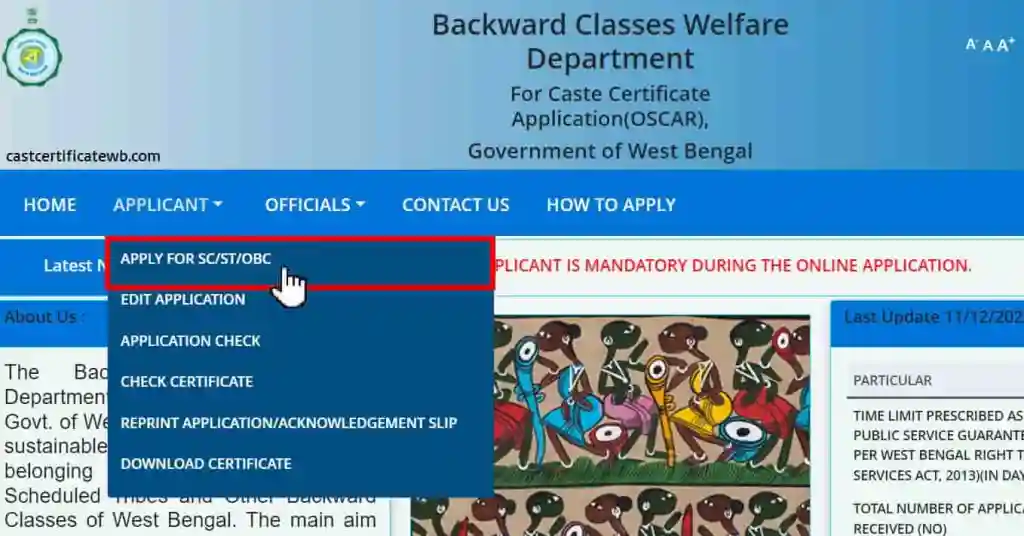
Apply for SC/ST/OBC Certificate 2026 [PAGE-1]
This is the first page of the application, in this given application form have 15 options to fill it up correctly. Now we are showing every single option one by one with pictures.
(If you want to download this form in PDF format and want to print it out to fill up manually on paper download it from here – DOWNLOAD ONLINE FORM PDF.)
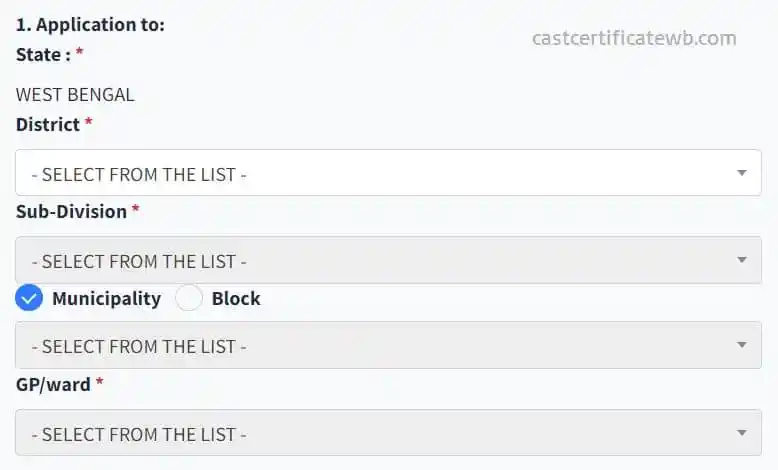
1. Application to:
To start this application you need to feel some basic information about where you live. As you see the application state is default selected West Bengal, obviously, it’s selected West Bengal because you apply for the state only. Now you have to select your District, and your Subdivision, select which type of area you live like Municipality or Block, and the last is Gram Panchayat (GP) or Ward.
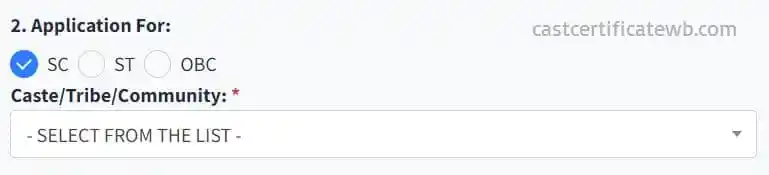
2. Application For:
This section is the most important section in this application form you have to select the application for means which certification you want to apply for SC/ST/OBC. If you belong to Schedule Caste then you select the first option (SC), if you belong to Schedule Tribes then select the second option (ST) or if you belong to Other Backward Classes select the third option (OBC). This is an important section also you have to select your caste, tribe, or community in the given list.
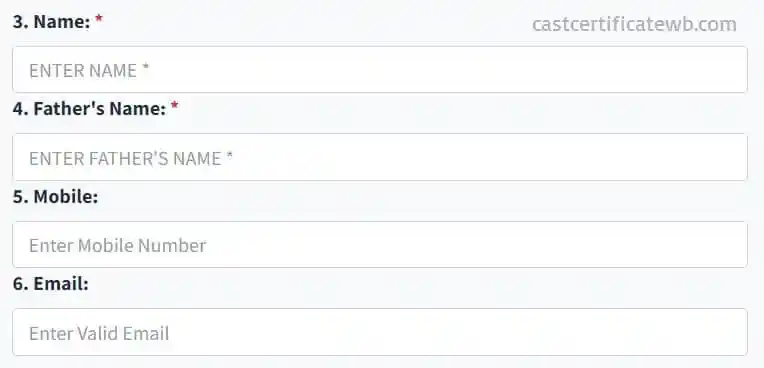
3. Name, 4. Father’s Name, 5. Mobile, 6. Email:
Where you have to feel your some personal details 1. Your full name, 2. Your father’s name, 3. Your active mobile number and 6. Your email ID. Your name and your father’s name must be filled but we suggest you fill in your mobile number and also fill in your email ID. The email ID is not important but if you have then feel it out. But the mobile number is recommended for getting your application-related details for future updates.
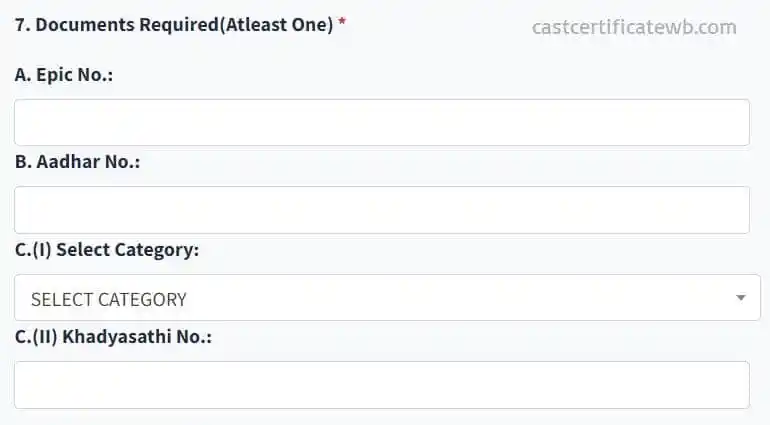
7. Documents Required (at least one)
To complete this application are document is required to prove your identity. You have not uploaded any document just fill up the information about the document. You can choose all of these options or any one option but you must have to select at least one option. You can enter your voter ID number, your Aadhaar number, or your Khadyasathi number. You may give all of this detail or any one detail.
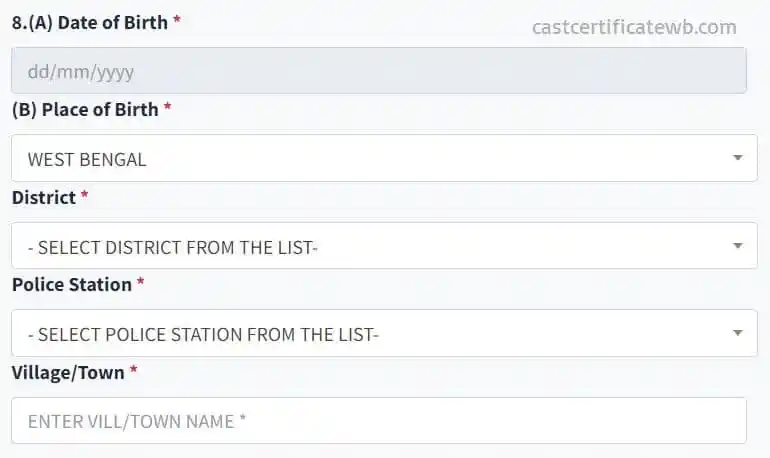
8. (A) Date of Birth, (B) Place of Birth, District, Police Station, Village/Town:
According to your birth certificate, you have to feel your date of birth and place of birth are important to verify your details. In this section also select your district, and your police station and enter your village or town name.
Exact Age Calculator
Need your exact age for the form? Enter your Date of Birth below:
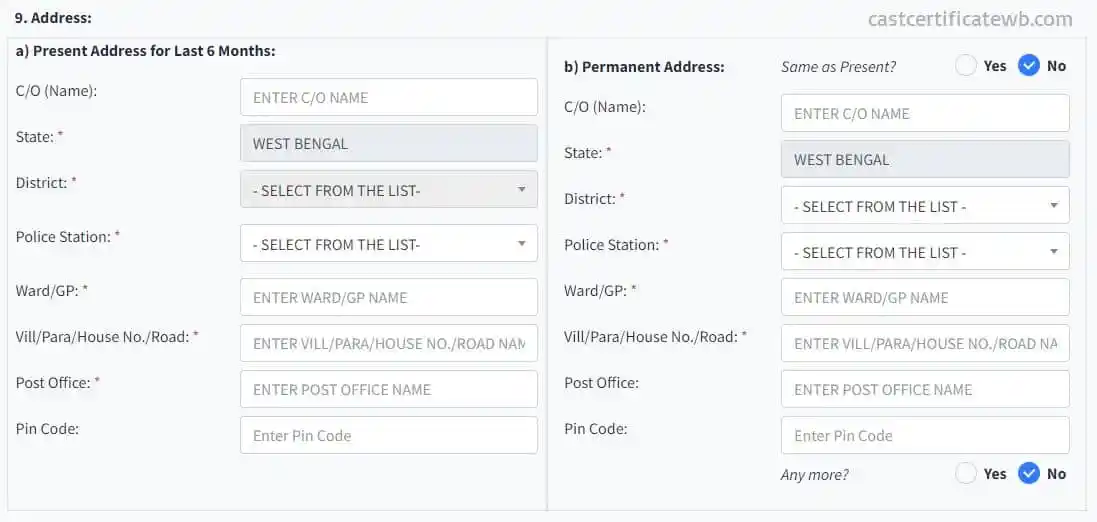
9. Address:
In this area you have to feel your address 1) your present address and 2) your permanent address. Must be for the last 6 months you have lived in this address in the permanent address is the address you live permanently. If you leave the same area as present or as permanent then you can feel the same as the present option YES.
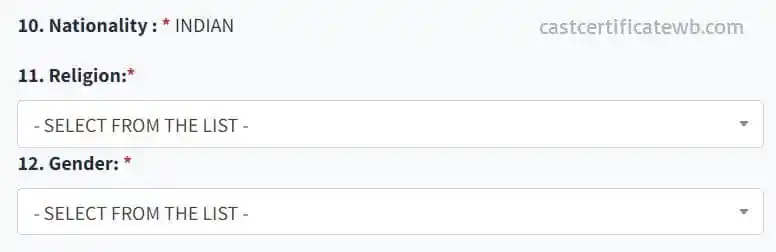
10. Nationality, 11. Religion, 12. Gender:
Now feel your nationality of course it’s Indian so it’s already filled up. Next, you have to feel your religion by selecting the option and the last one is your gender so feel this according to your belong.
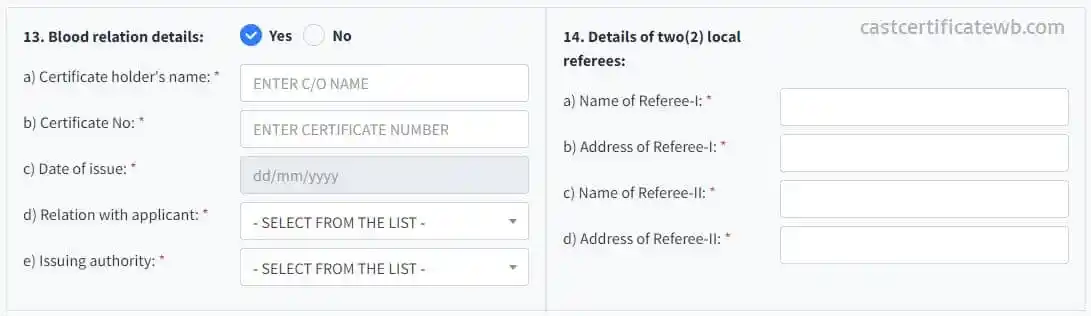
13. Blood relation details: 14. Details of two(2) local referees:
Here you have to fill in some important data about the blood relation detail and details of two local references. In the first column, you have to retail your blood relation details like your mother, father, brother, and sister or any other blood relation To you.
In the second column, you have to enter local references like your neighbor or anyone who knows about you. It basically proves that you are living in the same area and some people know about you and that you belong to them.
15. Whether the applicant or his family migrated from another State/Country?
In this section, you have to fill up the migration information about the family. If any of your family members are migrating from another state or country then you have to give details of them. If you haven’t migrated from any other country or state then just select the no option.
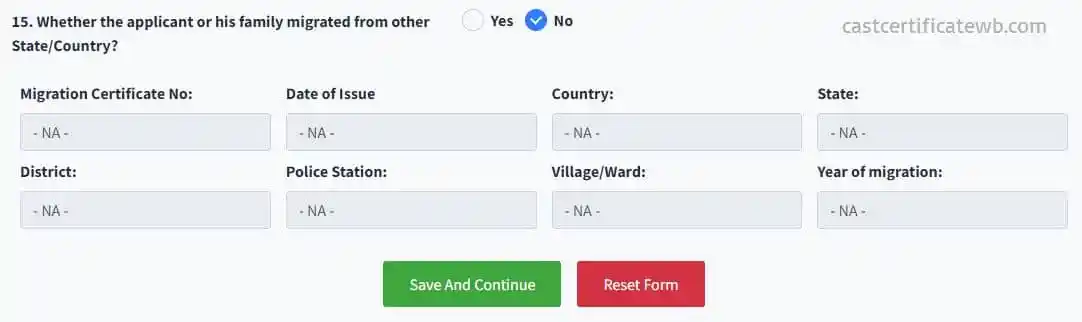
When you complete the form and then click on the “Save And Continue” button it will open page 2 of this application. If you make any mistakes then you can click on the reset form button it will open a new form. Let’s check what the next form-
Apply for SC/ST/OBC Certificate 2026 [PAGE-2]
When you successfully submit the first page of the application form you have to see the Second form on your screen. In this section, you have to enter some more internal information about your family.
A. Parents service details: in this section, you have to give details of your father’s and mother’s service details. You can select the service from the selection box, if your father’s or mother’s services are not listed then you just left “none of the above”.
B. Agriculture land holding: owned by mother, father, and minor children: if your parents have any agricultural land then you have to give the land holding details in this section.
C. Parent’s income/wealth: no The Last of this form is the income and wealth of your father and mother. You have to enter some details of your parent’s income like what is their salary or monthly income, what’s the annual income of your parents, if your parents file income tax then you have to give the details.
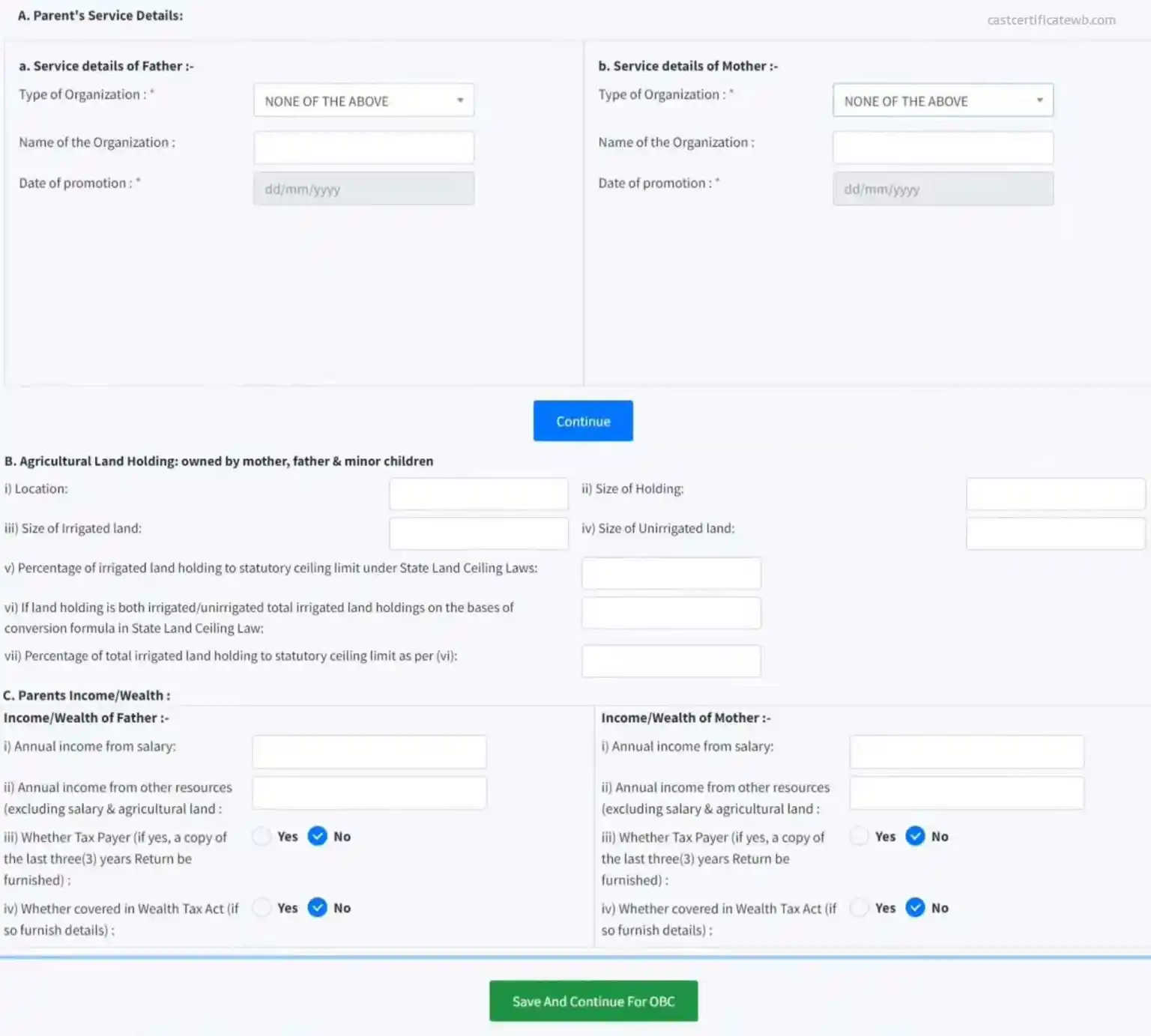
After completing the information in this form just click on “Save And Continue For OBC” After clicking this button you will be able to fill up the third form.
Apply for SC/ST/OBC Certificate 2026 [PAGE-3]
Now you are in the last stage of this application form this is the third and last form of this application. In this form you have to give some document-related information also upload only one file that was your scanned passport-size photograph, other document details are only entered and you do not have to upload any scanned copy.
| # | Document Type | Description |
|---|---|---|
| 1 | Applicant Photograph | You have to scan your passport-size photograph under the size 150 KB and upload this photograph in the first section. (remember the maximum size of photography is 150KB so before uploading you have to compress the file size). |
| 2 | Relationship Proof | This document is proof that you are given details of your relationship with the applicant. This means you give details of your blood relation detail here you have to give a document detail to prove your details. |
| 3 | Age Proof | This document is important for the proof of your age so select the correct document and give the proper document number on the detail box. |
| 4 | Photo Identity Document | Now select the photo identity document that you have you can select anyone from the list. |
| 5 | Proof of Citizenship | This document retail proves that you are a citizen of West Bengal so you have to select one of the citizenship identity proofs from the list. The birth certificate is the most valuable document in the section. |
| 6 | Proof of Residence in WB | As a title, you know that this document is proof that you are a resident of West Bengal so kindly select the document you have from the list and give the details of the document in the details box. |
| 7 | Proof of Local Residence | The area you live in you have to prove, so select the document of your local residence proof from the list given in the list. Also, give the details of the selected document in that details box. |
| 8 | Voter Card Information | The last option in this form is to give information about your voter card. Just check your voter card and give this detail like voter card number, assembly number, part number, and serial number. You can find all these details on your voter card. |
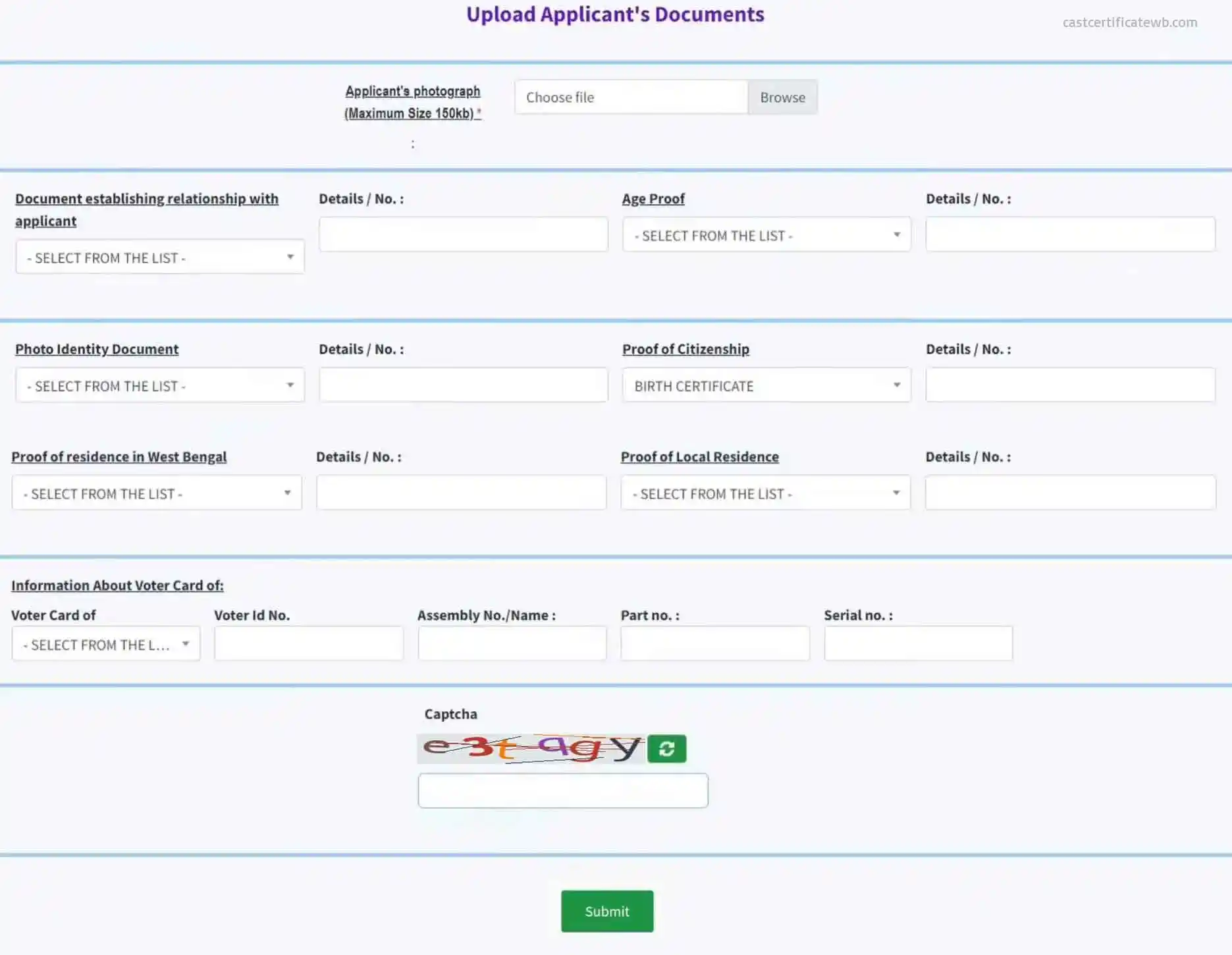
After giving every detail into the above form now you have to enter the capture quotes showing in the box before the submit button. Please enter this capture code carefully because it’s complicated so delete it carefully and enter in the box. Now click on the “Submit” button to submit the entire application form.
SC/ST/OBC Submitted Successfully
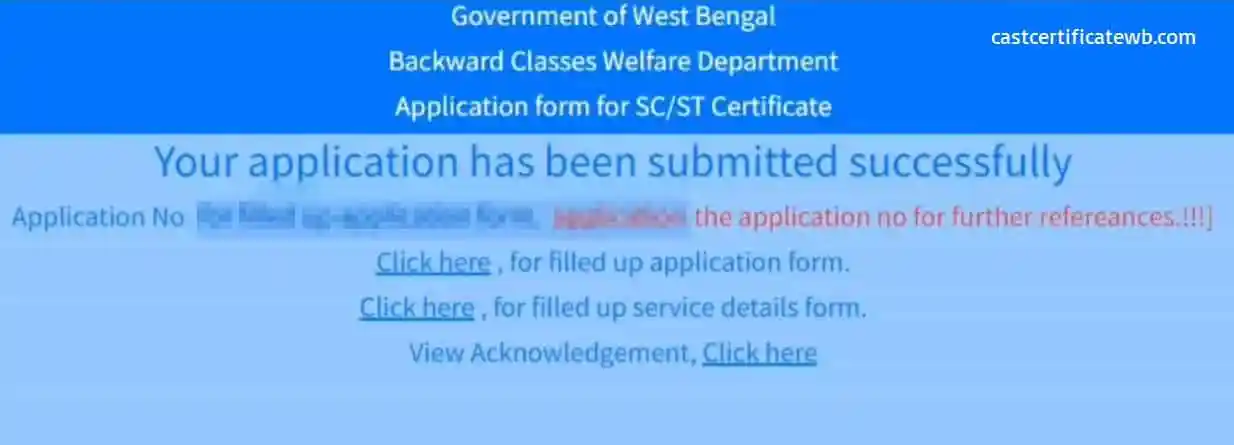
After submit the application you will see a new page with the title “Your application has been submitted successfully” Under this message you can see your application number. Please save this application number for your future uses like checking your “APPLICATION STATUS” and “DOWNLOAD CASTE CERTIFICATE“.
Caste Certificate Application Actions
| New Application | Edit Application |
| Application Check | Check Certificate |
| Reprint Application / Acknowledgement Slip | Download Certificate |